
A decision about which POS to use weighs heavily on any restaurant owner. Day-to-day running leans on it, just like how guests feel when they pay. Insights from reports come from this machine too, often shaping shifts and schedules. Growth down the road? That ties back to the screen at the counter. Efficiency lives or dies by what software runs behind the scenes.
A choice many restaurant owners wrestle with now? Picking between a cloud-based setup versus an old-school local one. Which path fits better comes down to daily needs, not trends. Some lean on internet-connected systems for their reach. Others stick with onsite hardware because it feels more predictable. Each brings trade-offs hidden beneath surface promises. What works smooth in one spot might stumble in another.
One handles transactions just like the other, yet their inner workings aren’t alike at all. Depending on how big your place is, where you want to go, what you’ve got to spend, and how things run day to day - either could fit better than expected.
This guide takes apart cloud-based and on-site POS systems. One moment it compares features, next it shows how each affects daily operations. Sometimes the contrast surprises owners. It walks through actual gaps between them. Choices depend on specific needs, not trends. What works in one diner might fail elsewhere. The answer hides in details most overlook.
Inside the restaurant, a local POS setup keeps information on a single machine or nearby server. For quite some time, that way of working shaped how eateries handled transactions. Even now, certain places stick with it instead of switching.
Running a point-of-sale system locally can help in certain situations - tiny shops or niche operations might find it useful. Sometimes control stays easier when everything runs on-site instead of online. A few businesses prefer keeping data close, avoiding outside servers altogether. For limited spaces where internet is spotty, offline access makes sense. Not every shop needs cloud features right away. Simpler tools sometimes match simpler goals better.
When web access fails, machines keep running on their own. That helps places where connections often drop.
Occasionally, regional point-of-sale setups require an upfront payment for the program. Instead of recurring charges each month, they opt for a single cost at the start.
Those who’ve run restaurants for years often stick with familiar in-person checkout setups.
Even when known well, neighborhood checkout setups carry serious downsides inside current dining spots.
Folks who own things need to show up in person just to look at reports or adjust anything.
New spots mean fresh setups, then moving info by hand. Each place needs its own system before details match across devices.
Frequent patches mean systems pause or need expert help.
Fees for fixing machines, copying data, plus help with tech problems add up after a while.
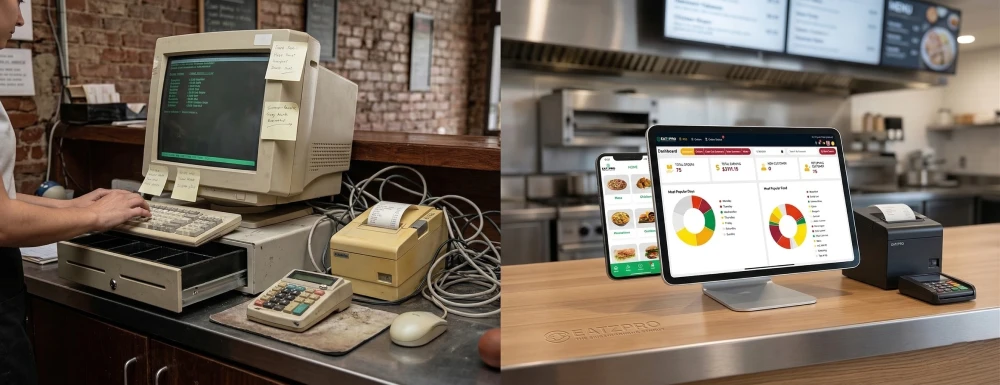
Online storage keeps information safe when using a cloud-based checkout setup. Access opens up through any web-linked gadget, no matter where it is.
Faster than old setups, today’s restaurant tech often lives online now.
Restaurant owners can:
Folks who run several locations often find this handy when they’re on the move too.
Cloud POS systems are designed for growth.
Smooth moves come easier when things stay tidy along the way.
Cloud POS providers regularly roll out updates that include:
Updates roll through on their own, slipping into place while work carries on. Each change arrives quietly, fitting itself around what's already moving.
Cloud POS Systems Work With Other Tools:
A single flow forms when pieces link together, not stack up separately.
One moment you’re saving on licenses, next thing - expenses pile up quiet-like. What looks light at the start grows heavier without warning.
Every now and then, it gets better on its own. Help shows up when needed, without asking twice.
Eventually, cloud POS tends to save money because upkeep costs less while operations run smoother. Though setup might take effort, the long-term gains usually balance things out. Efficiency climbs without constant fixes getting in the way. As days pass, these systems demand fewer resources just to keep going. Less downtime means tasks move faster with fewer hiccups along the way.
Security concerns keep plenty of restaurant owners awake at night, yet today's cloud-based POS setups usually guard data better than machines sitting under the counter.
True, these systems need the web to work fully. Still, many today can run without it for a while, handling simple tasks when connection drops.
These days, connections online tend to hold up better, so that old worry matters much less now.
With cloud POS, setup fees stay small while control moves online. Remote management opens doors beyond the shop floor. Flexibility shows up right away when systems live online.
Floating above hardware limits, Cloud POS grows as you do. Insights unfold through clear reports built right in. Connections form easily with tools you already use.
Running a business today? Most rely on cloud-based systems to keep things uniform across locations. One system manages it all from afar.
Finding the local POS up and running could happen - yet expect some restrictions. Still, it might function under certain conditions while lacking full capability.
A fresh take on modern dining tech, EatzPro runs in the cloud where updates happen quietly. Restaurants find it fits how they work now, without extra steps getting in the way. Its design grows around real daily demands instead of outdated routines. Smooth access from any device keeps things moving during busy hours. The system simply stays ready when teams need it most.
EatzPro helps restaurants grow:
Starting fresh each day, EatzPro simplifies what usually feels tangled in cloud setups. Owners find their way without hassle, just like staff do too. A smooth path opens up when tech steps back quietly.
A fresh order comes in fast, then shifts on a dime when plans change. That kind of pace matches how cloud-based checkout tools work - built to keep up without skipping steps.
Restaurant owners get access through them:
Cloud POS stands out when set beside local versions, especially in today’s busy eateries. Though older systems hold on in small operations, their limits show under pressure from growth needs, connected tools, and live data tracking.
Floating above old setups, cloud POS gives freedom along with grip on daily moves. When eateries eye expansion or smoother flow, the choice leans clear - this tech holds value longer.
A fresh start comes when eateries pick tools that just work - EatzPro fits quietly into daily flow. Not loud, not flashy, yet it keeps things moving behind the counter. Simplicity stays intact while updates slip in unnoticed. Reliability never gets traded for new features. The kitchen runs smoother, but still feels familiar.
Cloud POS systems store data online and allow access from anywhere using the internet, while local POS systems store data on on-site hardware and can only be accessed at the physical location.
Cloud POS is generally better for modern restaurants because it offers remote access, real-time reporting, automatic updates, and easy scalability across multiple locations.
Most cloud POS systems require internet for full functionality, but many modern systems (like EatzPro) offer offline mode to continue basic operations during connectivity issues.
Local POS systems may seem secure because data is stored on-site, but cloud POS systems often provide better security through encryption, automatic backups, and advanced access controls.
Yes. Many Modern Cloud POS Systems Include An Offline Mode That Allows Restaurants To Continue Processing Essential Transactions During Temporary Internet Outages. Once The Connection Is Restored, Data Automatically Synchronizes With The Cloud.
View MoreYes. Modern Cloud POS Systems Use Encrypted Data Transmission, Secure Cloud Storage, Automatic Backups, And Role-based Access Controls To Protect Restaurant And Customer Information. They Also Reduce The Risk Of Data Loss Caused By Hardware Failures Or Theft.
View MoreA Cloud POS Offers Several Benefits, Including:
A Local POS Can Continue Processing Transactions Without An Internet Connection, Gives Businesses Direct Control Over On-site Data, And May Involve A One-time Software License Instead Of Recurring Subscription Fees. However, It Often Requires Manual Updates And Ongoing Hardware Maintenance.
View MoreA Cloud POS Stores Business Data Securely In The Cloud And Allows Restaurant Owners To Access It From Anywhere With An Internet Connection. A Local POS Stores Data On On-site Hardware Or Servers And Is Typically Accessible Only From The Restaurant Location.
View MoreFor Most Modern Restaurants, A Cloud POS Is The Better Choice Because It Offers Remote Access, Real-time Reporting, Automatic Software Updates, Easier Integrations, And Multi-location Management. A Local POS May Suit Businesses That Require Offline-only Operations Or Prefer On-premise Data Storage.
View More